A Basic Threat Intel App
Electron more like “god-i-hate-JavaScript-tron” - 20/12/25#
I was looking at projects that I could do that I haven’t tried in the past and looked for something that could provide me value in my work but also a new learning opportunity. The idea that I settled on was to create a threat intelligence application that I can input file information or IP addresses into, and it would use external APIs to gather the information for and display within the application. Recently I saw some videos about electron apps and thought that surely this was something that could be used to make an app like this.
So, I looked up Electron and went through the introduction documentation to get a feel for how it worked and to get a “my-first-electron-app” made. From this point I looked at what modules I could hook into node.js to be able to make use of the HTTP APIs that are available for free with tools like VirusTotal. I have had previous experience working with these APIs through PowerShell and initially tried to figure out if that was the way that this could be used. After a few searches and installs of depreciated npm packages later, I decided that there is probably an easier way to do this.
This is where I did what I should have done from the start which was just to google “Node HTTP” to see what the native way of making http requests was and found the module within Node.js’ own documentation. From here I read through and decided that this was definitely a more sensible approach to using them and required a lot less faff to get it working. I wrote out some code and was looking at the “nodeIntegration” webPreference flag within my main.js file.
There was issue within my code when making use of require x functions as advised by some of the examples I had seen, and my console was telling me that it was not defined. This confused me and I spent some time looking at why this was occurring and found that with a locally used app you could set the nodeIntegration = true and it would negate the requirement for the required functions throughout. It is however not a secure practice when accessing remote content as it can allow jumps out of the renderer process and execute code locally on a computer.
Obviously with security being something that I should probably consider given my post and interest I decided that even if I was just building it locally, I would rather implement this in as secure a manner as possible. This meant that I needed to include code into my preload.js to make sure that the UI only has access to the specific VirusTotal related actions that I want to allow through. This meant including a function like:
function invoke(channel, payload) {

 const allowed = new Set(['virustotal:lookupHash', 'virustotal:lookupUrl']);
 if(!allowed.has(channel)) throw new Error('Channel not allowed');
 return ipcRenderer.invoke(channel, payload);

}
This allows only the 2 message types of ‘VirusTotal:lookupHash’ & ‘VirusTotal:lookupURL’ and in turn if anything that falls out with those allowed will trigger an error. If it falls within the allowed boundaries, then it will pass the request to the main process.
The functions are then expanded in the preload.js to do some input checking to make sure that the content is valid. So, making sure that the entered is the correct format/reachable or that the file hash only contains the relevant string characters. It then bridges these into the main script using a contextbridge which if I describe it using Electron’s own words, “Creates a safe, bi-directional, synchronous bridge across isolated contexts.”. Essentially allowing the code within my renderer (User interface) to call specific functions within the preload script. Once I had this set up, I now needed to actually create the UI within the renderer.js file to allow me/other users to make use of the functionality. Now with this area I cheated as I have no design ability whatever when it comes to JavaScript/CSS/html and so I asked Claude AI to make the bones of the app to allow me to edit it like a template to make it look exactly how I like and to stop it looking like a heaping pile of shit.
Once the buttons were on and AI had made it look pretty and hooked the buttons up to the functions to actually complete the searches with the user’s inputs, I got round to testing if what was written even worked. First thing I noticed was it looked terrible and made a note to change the layout, colours and my logo to the top. The first thing to check was the file hash check. The card that it made for this was neat and concise with a nice little example placeholder, a big blue submit button, and I decided to add on a little collapsible text field to explain how to get a file hash using Linux terminal or PowerShell. After the initial test this worked well and published the results into another card underneath the first. I was quite surprised that AI had made this work so well and so cleanly given some of the experience that I’ve had with it in the past, but this was short-lived after the URL lookup was not working at all. It took a while to unpick what exactly was causing the error in this function but after an hour or so of looking, I managed to get it working finally.
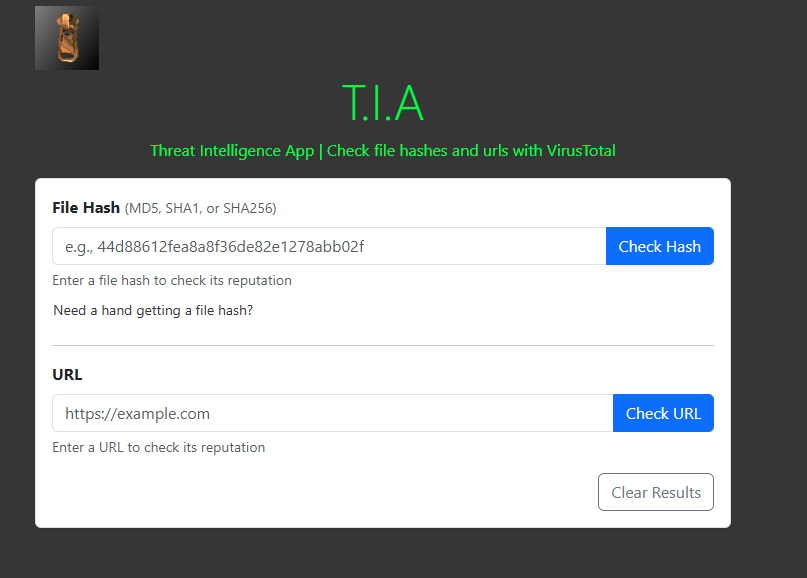
At this point I need to spend some time for final touchups to the UI to make it look exactly as I wanted before making use of Electron Forge to package it into an executable. I cleaned up the title of the application, the header once in the app and some of the text and colours to make it sound a bit more human and remove some of the soulless AI phrasing.
I leave for Poland to spend Christmas with my Fiance’s family tomorrow so will probably save this for when I get back. Keep an eye out on the Showcase tab of my site for when I make the repo for this project public and document the finished app. No doubt it is a wonky way to do it and I can barely claim it’s my app when I think AI coded triple the lines of code just in the visuals and bootstrap of the full app but nevertheless I’m chuffed I got the APIs working in something other than PowerShell and will make use of it from time-to-time.
Merry Christmas & Happy New Year!
Jack